
Before buying motion sensor cabinet lights, check the light’s size, sensor placement, mounting method, charging access, and brightness controls against the space you want to use it in. Choose a light you can position and recharge easily; motion activation alone does not tell you whether it will work well inside your cabinet.
- Choose motion sensor cabinet lights by fit, sensor access, and charging convenience—not motion activation alone.
- Izzy-346444347 lists a dimmable, USB-rechargeable cabinet light; check the selected option before buying.
- For wardrobe lighting and under-cabinet lighting, keep the sensor clear and the charging connection reachable.
- Test the position before attaching the mount, and keep ordinary room lighting for tasks that need it.
Why this matters
A cabinet light needs to work where your hands, shelves, and doors actually move. A light tucked behind a shelf edge can be awkward to trigger, while a light aimed toward your face can be uncomfortable to use.
For your 2026 buying checklist, start with the job rather than the feature list. Finding a shirt, checking a pantry shelf, and lighting a work surface call for different positions, even when the same type of light is under consideration.
The motion sensor cabinet lights listing describes a dimmable, wireless, USB-rechargeable LED tube light for wardrobes. Those details give you a starting point; match the selected option to your space before choosing it.
What should you check before buying motion sensor cabinet lights?
Check the installation as carefully as the light. Work through these 6 buying checks before deciding which option belongs in your cupboard, wardrobe, or kitchen.
- Fit: Measure the clear space where the light will sit, including room for doors, hinges, shelves, and stored items.
- Sensor position: Identify where your hand or body moves when you approach the space. Keep that path visible to the sensor.
- Mounting method: Check what holds the light in place, what surface it needs, and how you remove it.
- Charging access: Confirm the connection, charging instructions, and whether the light comes off its mount for charging.
- Light controls: Look for clear details about dimming, color choices, and how you select the operating mode.
- Everyday use: Decide whether you need brief light while reaching inside or steady light while working.
Write those answers beside your measurements. This turns a long product title into a simple purchase decision: does the light fit, does its sensor face your movement, and can you maintain it without emptying the cabinet?
A useful 2026 rule is to resolve the awkward detail first. If charging would require moving a crowded shelf, brightness controls will not fix the daily inconvenience.
Match the light to the place you will use it
The best position depends on what you need to see. Use this comparison to choose a placement to assess, not as a promise that every motion-sensor light suits every setting.
| Placement | Best for | Main benefit | Main limitation to check |
|---|---|---|---|
| Inside a wardrobe | Finding clothes when opening the wardrobe | Puts light near the clothes you want to see | Hanging clothes and shelves can obstruct the sensor or light |
| Inside a cupboard | Seeing items on a dark shelf | Directs light into the storage space | The door and shelf edges restrict mounting choices |
| Beneath an upper cabinet | Adding light near a work surface | Keeps the light above the area you use | The light can sit in your line of sight when you sit nearby |
| Near an entry storage shelf | Finding keys or dog-walking items | Places light beside an everyday storage spot | A sensor facing passing traffic can activate when you are not using the shelf |
For a wardrobe, think about the clothes already hanging there, not the empty space shown in a product photo. For a cupboard, inspect the door while it opens and closes. Under a cabinet, look at the proposed position both standing up and sitting down.
A rechargeable cabinet light is not automatically suitable for damp locations. Check the stated location restrictions before considering a bathroom, sink area, or anywhere exposed to splashes.
Measure the space before you choose a length
Take 2 measurements: the usable mounting length and the clearance around the proposed position. Do not count space occupied by a hinge, shelf support, or door movement as usable mounting room.
The light needs room to sit in place and room for you to remove or charge it. Check both. A neat fit is not useful if the charging connection ends up against a cabinet wall.
Also look at the direction of the light. A strip at the front of a shelf and a strip at the back do not illuminate the same surfaces. Think about the item you reach for most often and whether another object will sit between it and the light.
For your 2026 purchase, compare measurements with the exact option you select. A shared listing title does not replace checking the dimensions of that option.
Keep the sensor where your movement happens
A motion sensor needs a suitable view of the area it monitors. The practical question is whether your approach or hand movement passes through that area before you need the light.
Inside a deep cupboard, do not assume a sensor behind jars or boxes will respond when you open the door. In a wardrobe, hanging fabric can cover the sensor after you put the clothes back. Plan around the filled space.
Check the operating instructions for any darkness-dependent mode. A light that responds only in low light behaves differently from one set to respond whenever it detects movement. Choose the setting that matches the job rather than treating every sensor mode as interchangeable.
Do not buy on a detection-distance claim alone. Sensor direction, obstructions, and your approach matter to the placement. A stated distance does not tell you whether the light will notice your hand inside a particular cupboard.
Check dimming, color choices, and controls
Dimming lets you adjust light output, but the control needs to be reachable once the light is mounted. Check whether adjustment happens on the light itself and whether the intended position leaves that control accessible.
The listed cabinet light’s title includes 3 color choices. Check what those choices mean for the selected option and how you switch between them. Do not assume that a color label specifies a particular color temperature unless the product details state it.
For finding clothes or cupboard items, assess whether the light lets you distinguish what you need. For a night-time storage stop, consider whether the lowest available setting suits you. These are different uses, and neither requires choosing the brightest option by default.
Your 2026 comparison should separate adjustable controls from measured output. A dimmable label tells you that adjustment is offered; it does not provide a brightness measurement or show how evenly a shelf will be lit.
Check how mounting and charging work together
Read the mounting details before assuming the light will attach to your cabinet. Magnetic attachment, adhesive mounting, and screw-fixed mounting have different requirements; buy according to the method actually supplied with the selected light.
For adhesive mounting, follow the stated surface preparation and location instructions. For a magnetic mount, check which part attaches to the cabinet and which part comes away. If fixing hardware is needed, make sure the proposed position suits that method.
USB rechargeable describes a power connection, not a complete charging setup. Check the required cable, power source, charging instructions, and included accessories. Do not infer charging time or battery duration from the word rechargeable.
The strongest practical test is simple: imagine charging the light after the cupboard is full. If you cannot reach the connection or remove the light comfortably, choose another position before buying.
Why motion sensor cabinet light suitability varies
The same feature list can lead to different buying decisions because the installation changes. These factors explain what to compare:
- Cabinet layout: Doors, shelf edges, and hinges determine where the light can sit.
- Stored items: Clothes, jars, and boxes can obstruct illumination or the sensor.
- Approach direction: A sensor should face the movement that happens when you use the space.
- Mounting surface: The supplied attachment method must suit the actual surface.
- Charging access: The connection or removable mount must remain reachable after installation.
- Lighting task: Briefly finding an item differs from needing continuous light for work.
Choose for the filled cabinet, not the empty cabinet. That is the version you will use every day, and it is the one your placement needs to serve.
Is the Izzy-346444347 cabinet light a suitable choice?
Izzy-346444347 motion sensor cabinet lights are best for shoppers seeking dimming and USB rechargeability for wardrobe lighting. The listed title states those features, making this a relevant option to assess for that job.
The appeal is straightforward: adjustable light and a rechargeable format. The buying limitation is equally important: confirm dimensions, mounting details, sensor settings, and charging instructions for the selected option before deciding it fits your home.
Treat the listing as a candidate, not an automatic recommendation for every cupboard. Choose it when the stated details match your measurements and routine. If your main requirement is continuous work-surface lighting, check that operating mode explicitly.
What should you check when the light arrives?
Before fixing the mount permanently, follow the product instructions and make these 3 setup checks: Door movement, Sensor response, and Charging access. Test the proposed position with the cupboard or wardrobe arranged as you normally use it.
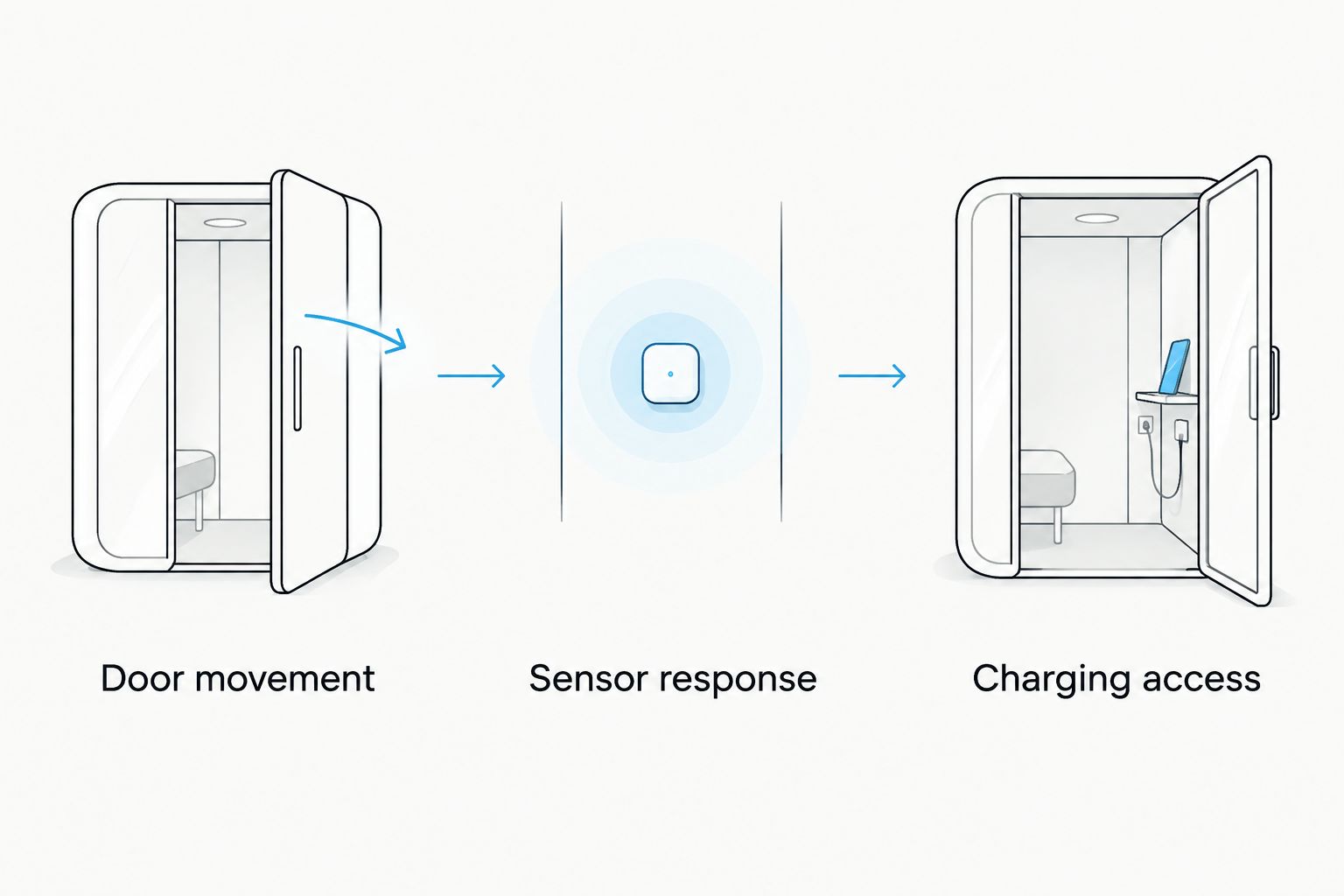
Open and close the door fully to check clearance. Approach the space as usual and test the intended sensor mode. Then check that you can reach the charging connection or remove the light using the stated method.
Do this before making the position permanent. Testing an accessible location first is more useful than discovering an awkward mount after you have finished arranging the shelf.
Do motion sensor cabinet lights replace kitchen lighting?
Motion sensor cabinet lights add local light; do not assume they replace your existing kitchen lighting. For food preparation or another task needing steady illumination, check the continuous operating mode and assess the lit surface rather than relying on motion activation.
Can you put motion sensor cabinet lights inside a wardrobe?
Motion sensor cabinet lights suit wardrobe placement when the selected light fits and its sensor remains clear. Check the hanging clothes, shelf edges, door movement, and charging access before attaching the mount.
FAQ
What should I check first when buying motion sensor cabinet lights?
Check the mounting space and sensor position first. Measure around hinges and shelves, then confirm that stored items will not block the sensor or the light.
Are rechargeable cabinet lights better than plug-in lights?
Choose rechargeable cabinet lights when their charging routine suits your installation. Choose a plug-in option only after checking the power connection and cable route; neither format is better for every cabinet.
Will a motion sensor cabinet light turn on in daylight?
Check the selected light’s operating modes to find out whether it responds in daylight. Darkness-dependent sensing and motion sensing are separate settings to verify.
Can I use motion sensor cabinet lights under kitchen cabinets?
Consider under-cabinet placement only after checking the light’s location restrictions, mounting method, and controls. Keep it out of unsuitable conditions and assess whether it provides the type of light your task needs.
What features does the Izzy-346444347 cabinet light list?
The Izzy-346444347 motion sensor cabinet lights listing describes dimming, USB rechargeability, a wireless format, and 3 color choices. Confirm the selected option’s dimensions and instructions before buying.
How long will a rechargeable cabinet light last between charges?
Use the selected light’s stated battery information and operating instructions to assess charging needs. Do not infer runtime from USB rechargeability alone.
What is the most useful cabinet-light buying advice for 2026?
Choose a position you can use and maintain easily in 2026. Check sensor response with stored items in place, and make sure charging does not require rearranging the cupboard.
One last thing
Before buying, stand where you normally use the cabinet and trace your hand’s path to the item you want. That small check helps you judge sensor placement, shadows, and reach together.
The useful light is the one that works with your routine. Fit, access, and clear controls deserve more attention than a long list of features.